Remote Appearances
Pursuant to Code of Civil Procedure section 367.75, California Rules of Court (CRC), rule 3.672, and Penal Code Sections 977, 977.3, and 1043.5 the El Dorado Superior Court offers the opportunity to appear remotely in various case types.
Notice: Any recording of a court proceeding held remotely, including "screen-shots" or other audio or visual copying of a proceeding, is prohibited pursuant to the California Rules of Court, rule 1.150.
Effective February 2, 2026
Beginning February 2, 2026, the El Dorado Superior Court will launch its new remote appearance platform, Unicorn Digital Courtroom (UDC), for all remote appearances. Please review the Amended Public Notice Re: New Remote Appearance Platform Effective February 2, 2026 for important information related to the changes.
How to Appear Remotely
Use the below steps to appear remotely.
-
Step 1: Submit a Remote Appearance Request
Parties seeking approval to appear remotely must submit a request pursant to Local Rules 5.01.00 and 7.02.00.
Civil Case Management Conferences, Ex Parte Proceedings, Family Law Trial Setting Conferences, and Juvenile Detention Hearings are exempt from the request process. Parties appearing in these hearings must proceed to Step 2 to register for the appearance.
Prepare Forms:
Prepare the appropriate form and file it in the department the hearing is scheduled.
Submit Request (choose one):
Submit Request via Web Portal1
All case types, excluding confidential mattersSubmit Request via eFiling1
Available for Civil, Family Law, Probate, and Small Claims mattersSubmit request at Clerks Office
Mandatory eFiling pursuant to Local Rule 7.08.00 applies. Self-Represented parties are exempt from mandatory eFiling.1Note: parties do not need to submit a request via both the Web Portal and eFiling. Please choose one option for filing.
Order on Request:
The Court will make an order on the request and notify parties. If your request is approved, proceed to Step 2 to register an appearance.
-
Step 2: Registration
Required Registration
Parties with an approved remote appearance request must register and pay1 for the appearance. Registration will open 14 days prior to the scheduled hearing.
Important Notice:
- Registration must be completed no later than 15 minutes prior to the scheduled hearing time.
- Failure to appear, either remotely or in person, may result in the hearing proceeding in your absence and/or other court action, including a finding of failure to appear.
- Same-day registration will incur a $5.00 late fee, subject to fees1.
- The email address used for the self-registration account is the email address that must be used to create and log into the Unicorn Digital Courtroom account to access the hearing remotely.
1Remote appearance fees are charged pursuant to Government Code 70630 and California Rule of Court, rule 3.672. Participants with a valid fee waiver or other applicable exemption will not be charged remote appearance fees.
-
Step 3: Appear
After registering for an appearance, you will receive a confirmation email from Tech Unicorn. Follow the link in the email to sign up for a Unicorn Digital Courtroom (UDC) account and join the hearing.
Note: The email address used for the self-registration account is the email address that must be used to create and log into the UDC account to access the hearing remotely.
Frequently Asked Questions
Yes. Every participant must submit a request to appear remotely unless excluded pursuant to Local Rule1.
1Pursuant to Local Rules 7.02.00 and 8.18.05, parties may appear remotely without prior court approval in Civil Case Management Conferences, Ex-Parte Proceedings, Family Law Trial Setting Conferences, and Juvenile Detention Hearings.
A New Appearing Party is a participant who is not currently listed as a party on the case and has not previously been approved to appear remotely
If you are not a party to the case but need to appear remotely on a hearing, please select "New Appearing Party" when uploading your request to appear remotely via the Web Portal.
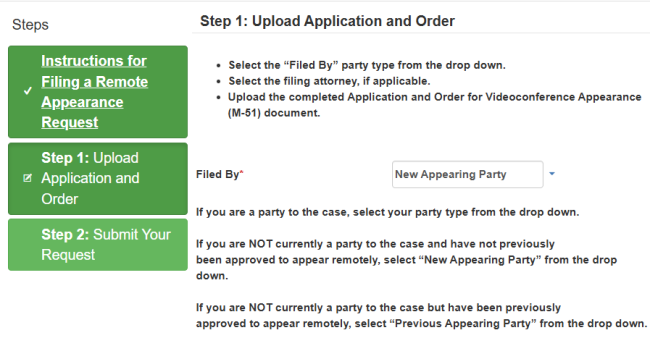
If you are attempting to submit your request form via the Court's Web Portal and the Submit a Remote Appearance Request button is not displaying, please contact the Clerk's Office for assistance.
Please note, confidential cases are not accessible via the Web Portal. Please choose another filing method for confidential matters.
Participants in Civil, Family Law, and Probate matters are subject to remote appearance fees consistent with Local Rules 5.01.00 and 7.02.00, CRC rule 3.672, Government Code section 70630. Participants with a valid fee waiver or other applicable exemption will not be charged remote appearance fees.
Civil, Family Law, & Probate Matters:
- $25.00 remote appearance fee
- $10.00 convenience fee
- Payment processing fee
Criminal, Traffic, Juvenile, Protective Orders, Mental Health, & CARE Act matters:
- No Fees
Fees will be charged on the day of the appearance.
If your hearing is not appearing on the self-registration portal, please verify the following:
- Case number is entered correctly. Case numbers can be found on the Court's Web Portal.
- Hearing is occurring within the next 14 days.
- It has been over 24 hours since the Court approved my appearance request.
If all of the above are true and your hearing is not appearing on the registration portal, contact the clerks office for assistance.
Yes, you are registered.
A status of Pending Confirmation in the Self-Registration portal means the user has registered for the associated hearing but the payment (if applicable) is pending.
If you have registered and elect not to appear remotely, you must cancel your registration on the Self-Registration Portal or you may be charged remote appearance fees, if applicable.
Additionally, you may be subject to the below cancellation fees:
- Cancellations four (4) or more days before the scheduled hearing date will not be charged fees.
- Cancellations one (1) – four (4) days before the scheduled hearing date, will be charged a $2.00 fee if the case is subject to fees.
- Same day cancellation on the date of the scheduled hearing will incur a $5.00 fee if the case is subject to fees.
No. Each participant must register via the self-registration portal and join the hearing via their own UDC account.
Multiple participants could join the hearing from the same UDC account if they are appearing together in the same location, using the same device.
All participants will wait in the hallway until their hearing is started. Please remain online and ready for court until you are brought into the courtroom.
Any recording of a court proceeding held remotely, including "screen-shots" or other audio or visual copying of a proceeding, is prohibited pursuant to the California Rules of Court, rule 1.150.
All remote users will wait in the hallway until admitted by the courtroom. Courtrooms may admit all remote users at the start of the hearing or they may call cases individually. Please continue to wait in the hallway until your case is called.
Please note, if your case does not appear under Today’s Appearances, you are not registered for the hearing and will not be admitted.